
If you're running a small business, and your visuals look cheap, you're leaving money on the table every single day. The product page is the storefront. The images are the salesperson. When your product photos look blurry, generic, or inconsistent, customers scroll past. They don't trust it. They don't buy it.
And here's the painful part. Getting professional photography done right is expensive. Studio rental, photographer fees, editing, revisions. By the time you're done with one product line, you're already in for a few thousand dollars. Most small business owners don't have that budget. So, they either settle for what they have, or they spend hours wrestling with Canva templates that still look like templates.
Let me show you a different way. LoveArt is an AI design agent built for small business owners. It's designed to help you create professional-grade visuals for your products, your brand, and your marketing, starting from scratch without a designer, and starting at $19 a month. In this walk-through, I'm going to show you exactly how this works, step by step, so you can see whether it's worth your time.
Here's the exact workflow I'll walk you through. We'll start with a raw product photo, the kind you take with your phone in your kitchen or your garage. We'll use LoveArt to turn it into a professional product shot with multiple angles. Then, we'll build consistent brand visuals using LoveArt's brand kit feature. Then, we'll edit text and images directly inside the platform in seconds. And finally, I'll show you how LoveArt turns those static images into video content for your social channels. This is a real end-to-end workflow that small business owners are using right now to cut their design costs and speed up their content production. Let's go.
Turning a Phone Photo Into a Professional Product Shot
The main dashboard gives you the core tools right away. Image generation, brand kit, video creation, and more. For this walk-through, I'll start with the most practical use case for small business owners: turning a raw product photo into something you can actually put on your store.
I'm going to upload a simple product shot taken on a phone. No lighting setup, plain background. This is what most of us start with. The interface is straightforward. You select the generation tool, upload your image, and type a brief description of what you want. LoveArt processes this and starts generating options in seconds.
What I love about LoveArt's workflow is that it doesn't just make one image. It gives you multiple variations to choose from. You'll see different lighting setups, different angles, different styles. You pick the one that fits your brand and move forward. This is useful because it means you can generate several options quickly and pick the best one rather than being locked into whatever a designer gives you the first time.
Once the generation is done, you get your results. Here's the part that saves you serious time: LoveArt's multi-angle feature. You take that single product shot and LoveArt generates multiple professional angles from it. Front view, side view, top down, 45°. Now, if you wanted to do this traditionally, you'd need a turntable, controlled lighting, and a camera. Or you'd pay a studio photographer hundreds of dollars per product for a full set of angles. With LoveArt, you're doing this in seconds from one phone photo.
This is especially valuable if you're selling on Amazon, Shopify, or any e-commerce platform that needs multiple product angles for a single listing. One photo in, multiple e-commerce-ready images out.
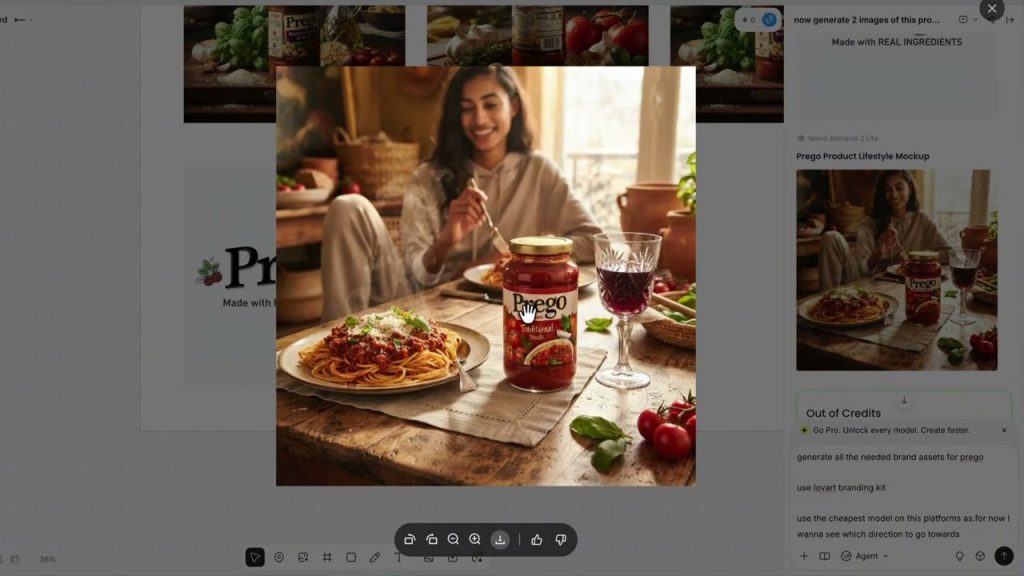
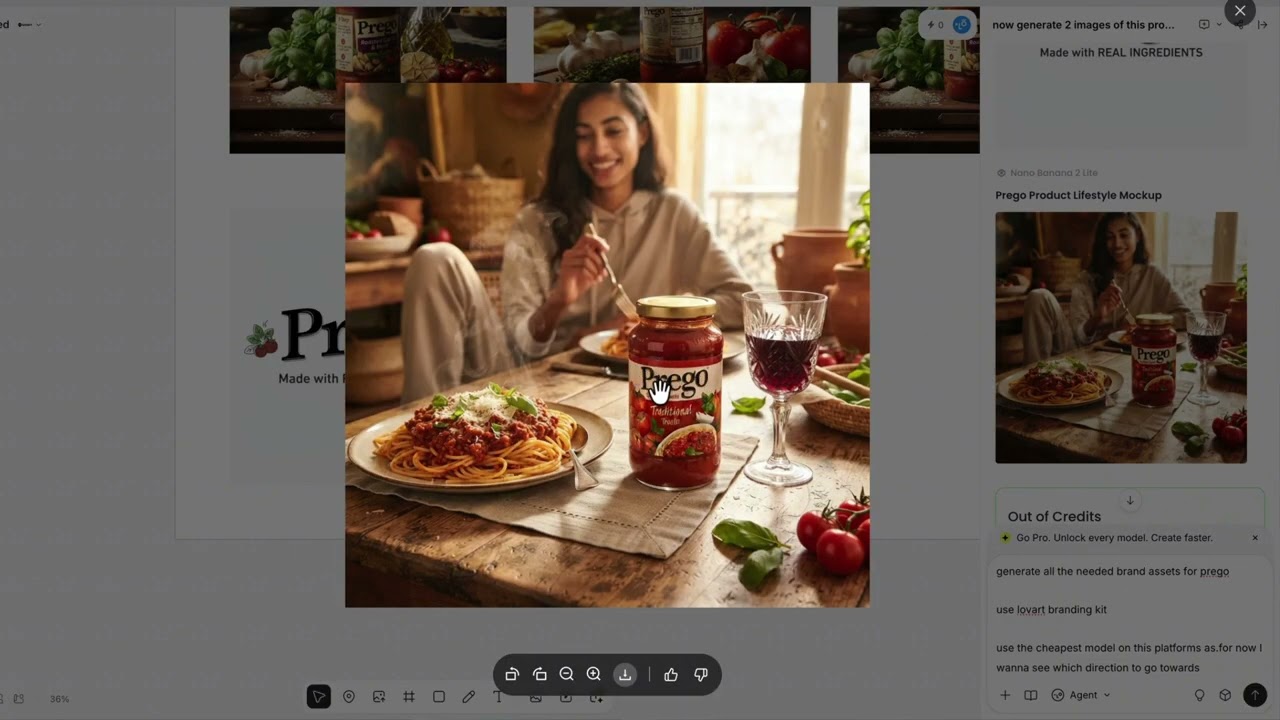
Beyond the standard product shots, LoveArt can also generate lifestyle context around your product. Instead of just a clean studio shot, it can place your product into a scene. A kitchen counter, a hiking setup, a professional workspace. So, your listing image does more emotional work. This is the kind of thing that normally requires a separate lifestyle photography session with props, models, and location scouting. LoveArt handles that in a single generation step, which is a significant workflow improvement if you're trying to move fast on a product launch. You can generate both the product shot and the lifestyle version in the same session, keeping everything consistent and on brand.
Building Brand Consistency That Actually Sticks
If you're running a small business with multiple products, you can't have every visual looking like it came from a different designer. LoveArt's brand kit feature solves this.
You define your visual identity once: your logo, your colors, your typography style. LoveArt saves this as your brand kit. Now, every time you generate a new product image, a social post, a label, or a banner, LoveArt keeps everything aligned with your brand automatically. You stop worrying about whether the blue in this post matches the blue in that one. The system handles it for you.
This is the part that used to require either a designer on staff or expensive agency work. Now, it's built into the workflow and it runs automatically every time you generate something, which means your whole brand feels cohesive even if you're the only person running it.
Editing Text and Images Without Leaving the Platform
One of the things that kills productivity is when you need a quick text change. Maybe you're running a promotion and you need to update a price or a date across five different images. Traditionally, that means going back into design software, finding the right layer, making the change, exporting again. With LoveArt's Touch Edit, you can tap on any text element in a generated image and change it directly. No regeneration, no export to another tool. Just tap, edit, done.
This is useful for anyone who runs regular promotions, holiday sales, new product launches, flash discounts. You generate once, then edit the text across variations in seconds. It's a simple feature, but it saves a disproportionate amount of time when you're moving fast on a campaign.
From Static to Motion: Creating Video Content
Beyond static images, LoveArt also has a video generation feature that can take your product images and create short video content from them. This is useful for social media ads, Shopify product videos, or Amazon lifestyle content. You don't need to animate anything manually. LoveArt's AI handles the transition from static image to motion.
Upload your product image, select the video generation tool, and LoveArt creates a short clip that showcases your product in motion. This is particularly helpful for e-commerce sellers who need video content, but don't have video editing skills or budget for a production team. The generated video keeps the same visual style as your brand kit, so the transition from static to motion feels natural and on brand. You can export this directly and drop it into your ad campaigns or product page, which cuts out another tool from your workflow entirely.
Who LoveArt Is For and What It Costs
This is designed for independent founders, local shop owners, e-commerce sellers, and creators building a business. Basically, anyone who needs professional visuals but doesn't have a design team.
At $19 a month, LoveArt is positioned as an affordable alternative to hiring a designer or paying for stock photography subscriptions. You get the design agent, you get the generation tools, you get the brand consistency features, and you get video generation all in one place. For a small business owner, that's a completely different economic calculation than paying hundreds or thousands of dollars for a single photo shoot.
The platform is designed so that you can start using it without any design background. You describe what you want in plain language and LoveArt handles the execution. The interface is clean and focused, not cluttered with options you don't need. If you're running a Shopify store, an Amazon listing, an Instagram for your brand, or even just trying to look more credible in your local market, LoveArt handles the visual production side of that. You don't need to learn Photoshop, you don't need to hire anyone. You describe what you want, LoveArt generates it, you edit what you need, and you export. That's the full loop for your business.
And because everything stays consistent with your brand kit, you can keep producing more content without it looking disjointed over time.
Key Takeaways
- Starting from a raw phone photo, LoveArt's AI generates multiple professional product images with consistent angles and lighting in seconds.
- You can place those products into lifestyle scenes for richer e-commerce listings, eliminating the need for separate photo sessions.
- The brand kit feature keeps every visual aligned automatically, so your whole brand feels cohesive even as you scale.
- Touch Edit lets you change text and details directly inside images without regenerating or jumping to another tool.
- The video generation feature turns static product images into short motion clips for social media and ads, maintaining your brand style.
- At $19 a month, the entire workflow replaces thousands of dollars in photographer and designer fees, and it's built for people who have zero design experience.
That wraps the walk-through. The whole workflow from upload to export runs in minutes, not days. If you want to try LoveArt for yourself, the link is in the description. Whether you're launching a new product line, building your brand identity from scratch, or just need better social media content, this is worth 20 minutes of your time. You might be surprised how far one product photo can go when the AI handles the heavy lifting.